How to Create Video Content for Nonprofits on Any Budget.
Learn to create nonprofit video content on any budget.
TL;DR
Nonprofits are no longer competing only for donations. They are competing for attention, trust and recall in a digital environment where people are watching more than they are reading. Video has become one of the clearest ways to show impact, explain programs, humanize beneficiaries, and move supporters from passive awareness to meaningful action. Yet many nonprofits still assume that video requires expensive equipment, professional crews or large production budgets. The reality is different. With the right strategy, even a small team can create credible, ethical and high-performing video content using tools they already have, low-cost production upgrades and free nonprofit platforms. This guide breaks down how nonprofits can build a practical video system without overspending.
Short-form video now delivers the highest content ROI of any format (HubSpot State of Marketing 2025), while the average nonprofit fundraising email converts at just 0.48% click-through (M+R Benchmarks 2025). The attention gap between where donors are and where most nonprofits show up is real and widening.
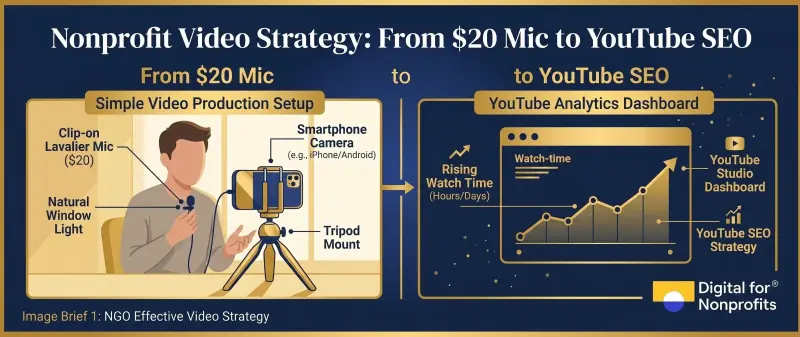
You can produce broadcast-quality nonprofit video for under $500 using equipment you mostly already own, a $20 lavalier microphone and free editing software like DaVinci Resolve.
The YouTube Nonprofit Program gives eligible NGOs exclusive features (mid-video donation links, a donate button that passes 100% of gifts to the nonprofit) that no standard YouTube channel can access. Most nonprofits have not activated it.
Your last fundraising email went out to 5,000 subscribers. Forty-eight of them clicked. That is not a deliverability problem or a subject-line problem. That is a format problem.
The average nonprofit fundraising email now converts at a 0.48% click-through rate, and only 12% of visitors who reach a donation page actually complete a gift . Meanwhile, HubSpot's 2025 State of Marketing report ranked short-form video as the highest-ROI content format of any type, with 93% of video marketers reporting positive returns . Adding video to a landing page can lift conversion by up to 80%. The donors your nonprofit is trying to reach are spending more than an hour a day watching video. They are not reading newsletters.
This guide is for the nonprofit that knows video matters but has not yet built a system for it. It covers production on a tight budget, which formats to use for which goals, how to win YouTube search through the YouTube Nonprofit Program, how to distribute one shoot across five platforms and how to measure results in terms that connect to actual donations. Two things are clarified upfront because they cost organizations real money when misunderstood: Google Ad Grants funds search-only text ads on Google.com and does not pay for YouTube video ads, and Microsoft Ads for Social Impact is being discontinued with final grants awarded November 30, 2025.
Why Nonprofits Can No Longer Afford to Skip Video
The M+R Benchmarks 2025 study, drawing from 216 nonprofits, put a number on the sector's pivot. Total nonprofit advertising investment rose 11% in 2024. Connected TV ad spending jumped 84% and now accounts for 15% of fundraising ad budgets. TikTok follower counts across nonprofit accounts grew 37% year-over-year, the fastest of any platform surveyed.
The consumer signal is equally clear. HubSpot's 2026 marketing data shows short-form video is now the most-used content format globally, overtaking both long-form video and blog posts. Sprout Social's 2025 Index places YouTube among the top platforms for brand discovery, with 76% of consumers active on the platform and 24% using it for product or cause discovery.
For nonprofits, the case is not just about engagement. It is about what happens when digital maturity stays low while donor expectations keep rising. D4NP's State of Nonprofits Digitization Report 2025 found that more than 83% of nonprofits worldwide score low on digital maturity. Low digital maturity means missing video almost entirely, which means mission work that never reaches the donors, volunteers and beneficiaries who would act if they only knew.
What Video Actually Does for Your Nonprofit (Beyond "Awareness")
"Awareness" is the word nonprofits reach for when they cannot yet measure something. Video does far more than raise awareness. It converts, retains and recruits.
Landing pages with video convert up to 80% higher than those without, according to conversion benchmarking data from Saleslion and Invespcro. M+R Benchmarks 2025 reports that 26% of all digital-ad-driven giving is "view-through" revenue, meaning donors who saw a video without clicking still gave within the attribution window. Video's influence on giving is consistently underreported because most organizations are not measuring it.
On audience building, YouTube Shorts, Instagram Reels and TikTok are now the primary discovery surface for donors under 40. Nonprofit Tech for Good's 2026 Social Media Statistics Report found that organizations using video consistently outperform those relying on static images on every major follower-growth metric.
Here is how format maps to outcome:
Your Nonprofit Video Production Kit: From $0 to Under $1,000
Most nonprofits dramatically overestimate what it costs to produce video that works. The kit you already have will get you further than you think.
What You Already Have (The $0 Setup)
The smartphone in your communications manager's pocket is a broadcast camera. Modern smartphones shoot 4K at 60fps with image stabilisation built in. The limiting variable is not the sensor. It is audio, lighting and stability.
For editing, DaVinci Resolve is fully free with no watermark, supports 4K UHD output and runs on Windows, macOS and Linux. iMovie ships with every Mac. Microsoft Clipchamp offers watermark-free 1080p export inside Windows 11. There is no reason a nonprofit should be paying for editing software at entry level.
The $200 Audio-First Upgrade
Audio is the single quality variable that separates amateur from professional video. Viewers tolerate imperfect lighting far more readily than tinny, echoey sound.
A Boya BY-M1 wired lavalier microphone costs approximately $20 and plugs directly into your smartphone headphone jack. A ring light costs $25-$80. A basic tripod runs $15-$40. That is a complete upgrade for under $150, and audio is the line item doing the heaviest lifting. For design assets and video templates, Canva for Nonprofits gives eligible organizations free Canva Pro access for a team of up to 50 users, including its full stock library and AI video tools. Adobe Express for Nonprofits is also free for verified organizations through Goodstack.
The Sub-$1,000 Professional Kit
Stepping up to a professional field-production kit does not require a production company. It requires three deliberate purchases.
The Rode Wireless GO II is the field-interview standard at approximately $299: a dual-transmitter wireless lavalier system with a 656-foot range that records directly to the transmitter as a backup. Two LED softboxes run $80-$150 total. A DJI Osmo Mobile smartphone gimbal adds smooth movement for $100-$150. For editing, DaVinci Resolve Studio is a one-time $295 perpetual license with professional AI noise reduction and color tools. No subscription, which matters for nonprofits planning annual budgets.
One explicit tool warning: CapCut was removed from US app stores in January 2025 under federal legislation, and its June 2025 Terms of Service grant perpetual royalty-free rights to user-uploaded content. This is a serious problem for nonprofits filming beneficiary stories. Descript overhauled its pricing in September 2025 and now charges by "media minutes" and "AI credits" rather than a flat rate. Confirm current nonprofit pricing directly with Descript before budgeting.
Scripting Without a Copywriter
The most effective short-form structure for nonprofit video is Hook, Story, CTA: a 1-3 second scroll-stopper, 10-50 seconds of value or narrative, then a 3-7 second explicit ask. For fundraising appeals, Problem-Agitate-Solution works well: name the problem your beneficiaries face, show what it costs them, then position the donor as the person who can solve it.
The most important structural principle across all formats: frame the donor as the hero and your organization as the guide. Your nonprofit is not the savior. The donor is. Content built on this structure converts better and builds longer-term trust than content built on pity.
Documentary, Explainer or Short-Form? Choosing the Right Format
Format choice should follow goal, not aesthetics or what another organization happens to post.
Documentary-Style Impact Films
Documentary storytelling is the highest-converting format for emotional fundraising. Two to eight minutes. A single beneficiary's story told with B-roll, natural sound and a voiceover that steps back and lets the person speak.
charity: water's "The Spring" launch documentary raised $2.4 million in 30 days and anchors a monthly giving program with more than 22,000 members. Save the Children UK's "Most Shocking Second a Day" reached 53 million views and 1.5 million shares. World Central Kitchen's Ron Howard-directed Disney+ documentary "We Feed People" significantly expanded its donor base. These are not anomalies. Documentary works because it asks for trust, and trust is what major giving requires.
Use documentary format for: year-end appeals, capital campaigns, gala films, annual report storytelling and major donor cultivation.
Explainer Videos
Explainer videos are the workhorses of nonprofit digital strategy. Sixty to 180 seconds for animated or mixed-media formats; five to fifteen minutes for tutorials and educational content. They are evergreen, embeddable and consistently among the most shareable nonprofit content online.
The Girl Effect's animated explainer "The Clock is Ticking" raised £2 million through GlobalGiving. Khan Academy built its entire 9,000-video educational library starting from one person with a tablet, screen-recording software and a voiceover microphone. HIAS uses 2D animation to explain refugee resettlement law in plain language to new audiences worldwide.
Use explainer format for: homepage mission statements, program introductions, beneficiary onboarding, advocacy campaigns and grant application support.
Short-Form Video: Reels, TikTok and Shorts
Short-form video is your top-of-funnel engine. In most cases it does not convert donors directly. It puts your mission in front of people who have never heard of you.
Platform length benchmarks matter more than most nonprofits realize. Instagram Reels was extended to three minutes in early 2025, but peak engagement remains at 15-30 seconds . TikTok allows 60-minute uploads via web but engagement peaks at 21-34 seconds. YouTube Shorts performs best at 15-60 seconds after the platform extended its limit to three minutes in late 2024.
The USC MIND student club launched the #SpeakYourMIND challenge on March 31, 2025 with a $500 fundraising goal for mental health advocacy. In five weeks it raised over $500,000, grew the Instagram account to more than 700,000 followers and drew participation from Peyton Manning, Eli Manning and Jenna Bush Hager. No production budget. No agency. A simple repeatable format, a nomination chain and a clear mission.
Use short-form for: awareness campaigns, volunteer recruitment, beneficiary celebrations, event promotion and building weekly presence on discovery platforms.
Testimonials, Behind-the-Scenes and Live Video
Donor testimonial videos (30-90 seconds, built around a single prompt like "why do you give?") are the highest-converting fundraising asset per dollar of production. They require no script, no studio and no crew. A smartphone, a window and a warm question are the entire kit.
Behind-the-scenes content humanizes the organization for recurring donors and works well as a mid-cycle retention tool. Live streams on YouTube, Facebook and Instagram build community at low polish thresholds and are especially useful during matching campaigns, galas and milestone announcements.
Format-by-Goal Summary:
Ethical Storytelling: The Standard Every Nonprofit Video Must Meet
Every nonprofit video is a representation of a person who did not write the script. That responsibility carries real weight.
The Dóchas Code of Conduct on Images and Messages, adopted by more than 70 international NGOs, sets three principles: dignity, equality and solidarity. In practice: secure informed consent before filming, avoid close-up shots of suffering or distress, and frame subjects at eye level rather than looking down at them. Do not reduce a complex human life to a single moment of need.
The practical storytelling frame that holds all of this together: your beneficiary is a full person with agency, not a case study. Your donor is the hero of the change. Your organization is the guide that makes the connection possible. Content built on this structure converts better and builds longer-term trust than content built on pity or urgency.
YouTube SEO for NGOs: The Complete Playbook
YouTube is both a search engine and a social platform, and it rewards nonprofits that treat it as both. Here is how to win on both dimensions.
The YouTube Nonprofit Program: Activate This First
The YouTube Nonprofit Program is the single most underused free asset in nonprofit digital marketing. Eligibility runs through a Google for Nonprofits account, validated by TechSoup or Percent/Goodstack depending on your country, and is available in 65+ countries. Governmental entities, hospitals and schools are excluded.
The most important exclusive benefit is Link Anywhere cards: mid-video clickable overlays that link to any external URL, including your donation page. Standard YouTube channels cannot add clickable external links within a video. For a nonprofit, this means the moment a viewer is most emotionally engaged (mid-documentary, mid-testimonial) you can place a donate link directly on screen.
The YouTube Giving donate button adds a fundraising button to videos and channel pages for US 501(c)(3)s verified through Candid. YouTube and Google cover processing fees, so 100% of each gift reaches the nonprofit. These two features alone justify activating the program before publishing a single video. You can learn how to get started through our Google for Nonprofits guide and check your eligibility through our tech grants portal.
How the YouTube Algorithm Works in 2026
YouTube runs three distinct algorithms: one for search results, one for browse and homepage recommendations, and one for Shorts. Recommendations drive roughly 70% of all watch time on the platform.
The ranking signal stack, in order of weight: click-through rate on the thumbnail, average view duration, session watch time (the total time a viewer continues watching after your video ends), viewer satisfaction signals and engagement velocity in the first 24-48 hours after upload.
In February 2025, YouTube updated its recommendation system to layer post-view sentiment over raw watch time. Content that viewers rate as "satisfied" or "very satisfied" in periodic surveys receives disproportionate distribution. For nonprofit story content, this is a structural advantage: emotional resonance and viewer satisfaction are highly correlated.
Optimising Titles, Descriptions, Tags and Thumbnails
YouTube titles cap at 100 characters but truncate to 50-60 on mobile. Front-load the primary keyword and write for mobile-first visibility. A title like "How NGOs Are Using Video to Double Online Donations" puts the value proposition and keyword inside the first 55 characters.
Descriptions should run 200-500 words minimum, with the primary keyword appearing in the first 100-150 characters visible above the fold. Structure the description as: a hook sentence, a summary paragraph, timestamps (chapters), your donation link, resource links and three to five hashtags. Tags now contribute almost nothing to YouTube SEO. Use five to fifteen relevant ones and stop there.
Thumbnails should be 1280x720 pixels. Use a human face with a high-contrast expression. Limit on-thumbnail text to three to five words at a size readable on a phone screen. YouTube Studio now supports native thumbnail A/B testing, which rolled out broadly in 2024-2025. Use it consistently.
Chapters, Playlists, End Screens and Cards
Chapters require at least three timestamps starting at 0:00, added in the video description. They improve YouTube search visibility and unlock "Key Moments" rich results in Google Search, where your video can surface as a structured clip directly on the results page.
Playlists drive session watch time by autoplaying content sequentially. A welcome series playlist for new visitors, an impact stories playlist for donors and a how-to-help playlist for prospects covers most nonprofit needs. End screens during the final five to twenty seconds of a video are the most underrated lever in nonprofit YouTube strategy: they funnel viewers into the next video or playlist, extending session time and improving algorithm signals.
Captions: Accessibility, SEO and the 80% Rule
Roughly 80% of social video is watched with the sound off. Captions are not optional. They are the difference between someone watching your video and someone scrolling past it.
YouTube auto-generated captions run at approximately 70% accuracy, which is insufficient for names, place names and programme-specific terminology. Upload a corrected SRT file generated through Otter.ai (300 free minutes per month), Descript or YouTube's own caption editor. For multilingual audiences, add translated caption files for your top three geographic markets. This is both a Google Search SEO signal and a compliance requirement under WCAG, the ADA and the European Accessibility Act.
For Google video search beyond YouTube, implement VideoObject schema in JSON-LD on every page hosting video. Include the required fields (name, description, thumbnailUrl, uploadDate) plus duration and contentUrl. Schema does not directly boost rankings, but it improves discoverability in Google Discover, Google AI Overviews and rich snippets, and that improvement compounds over time.
A Critical Clarification: Google Ad Grants and YouTube
Google Ad Grants provides $10,000 per month in in-kind search-only text ads on Google.com. A September 2024 update added limited Performance Max access for Ad Grants accounts, but Performance Max under Ad Grants does not include YouTube placements or Display Network advertising. It functions as an enhanced version of dynamic search ads.
To run paid YouTube video ads, a nonprofit needs a separate standard Google Ads account with its own budget. The two accounts can coexist and are not in competition. This is one of the most common and expensive misconceptions in nonprofit digital strategy. D4NP's Google for Nonprofits guide explains exactly how the two work together.
Distributing Your Video Across Five Platforms from One Shoot
One shoot should produce a quarter's worth of content when repurposed deliberately.
The One-Shoot-Five-Platforms Workflow
Shoot at 4K horizontal with your subject framed in the central square zone so every crop works. From one master file, generate:
A 16:9 cut for YouTube full-length, Facebook feed and LinkedIn desktop.
A 9:16 vertical cut for Instagram Reels, YouTube Shorts, TikTok and Stories.
A 1:1 square cut for LinkedIn feed and X.
A 60-second hook clip from the strongest minute of the full video.
A 15-30 second micro-clip from the opening or a peak emotional moment.
Burn captions directly into vertical clips before posting to sound-off feeds. Strip platform watermarks before cross-posting: Instagram deprioritizes TikTok-watermarked content in its algorithm. Use Kapwing, Vizard or VEED.io to automate vertical cropping and caption styling.
Platform-by-Platform Breakdown
Video in Email Campaigns
Most email clients block embedded video playback entirely. The best practice is an animated GIF preview (a three to five second loop from the video's strongest moment) or a static thumbnail with a play-button overlay linked to a landing page. Neither approach plays video inside the inbox. Both communicate that something worth clicking is waiting.
Video-in-email campaigns consistently outperform image-only campaigns on click-through rate. The lift is especially strong in mid-cycle donor cultivation and year-end sequences, where the video does the emotional work that plain text cannot.
Video on Your Website and Donation Page
Video on a donation landing page can increase conversion by up to 80% . The configuration that works: one mission or impact video above the fold, one Donate button with no competing CTAs, and a page that loads in under three seconds on mobile. Pages slower than three seconds lose 53% of mobile visitors before the video even starts.
Do not auto-play with sound. It triggers browser blockers, consumes mobile data and violates WCAG accessibility standards. Auto-play muted with captions is acceptable on homepages where the video is ambient rather than the primary CTA.
Measuring What Actually Matters
Vanity metrics are expensive. View counts look impressive on a slide and tell you almost nothing about whether video is working for your mission.
The Three Metric Tiers
The performance tier covers click-through rate, average view duration and session watch time. These are algorithm inputs, and they tell you whether the content is good. If CTR is below 3%, fix the thumbnail. If average view duration is below 30%, fix the first 60 seconds. Both are fully within your control to improve.
The conversion tier covers Link Anywhere card clicks, donation-page traffic and donations attributed via UTM-tagged URLs. This tells you whether the content moves money. Every link in every video description and every Link Anywhere card should carry a UTM parameter so YouTube appears as a distinct revenue source in your CRM.
The audience tier covers subscribers gained per video, returning viewer percentage and demographic match to your actual donor base.
Your Nonprofit's Video Plan for the Next Quarter
You do not need a production company, a videographer on staff or a six-figure campaign budget to make video work for your nonprofit. You need a system.
Here is what a functional first quarter looks like:
Activate the YouTube Nonprofit Program through your Google for Nonprofits account. This unlocks Link Anywhere cards and the YouTube Giving donate button before you publish a single video.
Assemble a production kit anchored by a $20 lavalier microphone and DaVinci Resolve Free. Upgrade audio before anything else.
Commit to one 5-8 minute documentary impact film per quarter and one Short or Reel per week. The documentary converts. The short-form builds the audience that eventually watches it.
Repurpose every long-form shoot into vertical, square and 60-second hook cuts using Kapwing, Vizard or VEED.io. One shoot should produce at least five distinct pieces of content.
Instrument GA4 Enhanced Measurement and UTM-tag every link in every video. Connect donations to videos from day one, not month six.
More than 83% of NGOs are not using free digital tools they already qualify for (D4NP State of Nonprofits Digitization Report 2025). The YouTube Nonprofit Program is free. The Google for Nonprofits registration that unlocks it is free. The production kit that creates content to fill it starts at $20. The gap between nonprofits growing their online revenue through video and those that are not is not a budget gap. It is a systems gap.
If your organization is ready to build that system, D4NP works with nonprofits at every stage of digital readiness: from filming your first beneficiary story to building a full multi-platform content strategy backed by tech grants and generative AI.