Nonprofit Email Campaigns That Convert: Templates and Tips
Learn how to write nonprofit fundraising emails that convert. Subject lines, storytelling, CTA placement, A/B testing, and real templates.
TL;DR
Email generates $36 for every $1 spent, making it the highest-ROI fundraising channel available to nonprofits. But only when the fundamentals are right.
Subject lines, storytelling, CTA placement, and A/B testing are the four levers that separate emails that convert from emails that get deleted.
This guide includes three ready-to-use fundraising email templates with inline annotations, so you can adapt and send them today.
Your donor has 8 seconds.
That is the average time someone spends scanning a new email before deciding whether to read it or delete it. Eight seconds. No time for a slow opener, a vague subject line, or a "Donate Now" button buried at the bottom.
For nonprofit fundraisers, email is still the most powerful digital channel available. It generates approximately $36 for every $1 spent, outperforming social media, paid search, and display advertising combined. According to the 2024 Nonprofit Tech for Good Report, 33% of donors worldwide say email is what most inspires them to give. No other digital channel comes close.
The gap is not in the channel. The gap is in the craft.
Most NGO fundraising emails underperform because they lead with the organization's needs instead of the donor's opportunity. They bury the ask. They tell statistics when they should tell stories. And they never test a single variable.
This guide fixes that. You will find concrete subject line formulas, a storytelling framework that works, a CTA placement strategy backed by sector data, three ready-to-use nonprofit email templates, and a practical primer on A/B testing for teams with small lists and limited time.
Why Email Still Outperforms Every Other Fundraising Channel
Before getting into tactics, it helps to understand why email deserves this much attention.
Nonprofits that invest in email strategy see measurably better fundraising outcomes. According to M+R Benchmarks data, nonprofit emails achieve open rates of 28.95 %, outpacing the all-industry average of 21 to 22%. Festivals and year-end are also when email efforts tend to compound. Tax-year deadlines and matching gift windows give donors a concrete reason to act, and nonprofits that run a structured email series in November and December typically see their highest campaign response rates of the year.
The pattern holds globally. D4NP's State of Nonprofits Digitization Report found that 83% of Indian NGOs are not using free digital tools available to them, including email marketing platforms with nonprofit discounts or free tiers. The organizations leaving email on the table are not just missing clicks. They are missing their most cost-effective path to donor retention and mission growth.
Retained donors are worth exponentially more than new ones. Monthly giving donors have a year-over-year retention rate of roughly 80 to 90%, compared to approximately 43% for first-time donors. Email is the primary channel through which monthly giving relationships are built and sustained.
The investment is justified. Now, let us talk about how to make the emails work.
The Anatomy of a High-Converting Nonprofit Fundraising Email
Every high‑performing fundraising email shares 10 core building blocks. Getting all ten right is what separates a truly effective fundraising email from one that barely works.
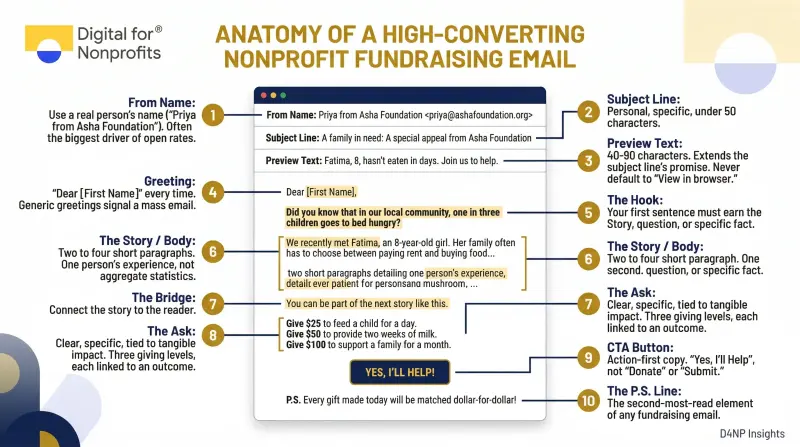
Here are the ten elements and why each one matters:
From Name: Use a real person's name ("Priya from Asha Foundation"), not just the organization name. The from name is often the single biggest driver of whether an email gets opened.
Subject Line: Personal, specific, under 50 characters. More on this in the next section.
Preview Text: The 40 to 90 characters that appear next to the subject line in the inbox. Never let it default to "View in browser." Use it to extend the subject line's promise.
Greeting: "Dear [First Name]" every time. Generic greetings signal a mass email.
The Hook: Your first sentence must earn the second. Start with a story, a question, or a specific fact. Not "I am writing to tell you about our campaign."
The Story / Body: Two to four short paragraphs. One person's experience, not aggregate statistics.
The Bridge: Connect the story to the reader. "You can be part of the next story like this."
The Ask: Clear, specific, tied to tangible impact. Three giving levels. Each is linked to an outcome.
CTA Button: Action-first copy. "Feed a Child Today" or "Yes, I'll Help", not "Donate" or "Submit."
The P.S. Line: The second-most-read element of any fundraising email, after the subject line. More on this below.
Subject Line Best Practices for Donor Emails
The subject line is your email's first and most important test. It determines whether everything else gets read at all.
Optimal Length and Format
Keep subject lines between 30 and 50 characters. On mobile, only 30 to 35 characters display before being cut off, and roughly 41.6% of nonprofit emails are opened on a mobile device (M+R Benchmarks). Design for the smallest screen first.
Aim for 5 to 9 words. Question-based subject lines, story-first lines, and specific-number lines consistently outperform vague, organizational subject lines in sector A/B testing.
Personalization That Actually Works
Personalizing your nonprofit email subject line increases the open rates by 27% and click rates by 11%. But personalization goes deeper than merge tags.
Referencing a donor's past giving is among the most powerful approaches available: "Your $50 gift last year helped 3 students. Here's what happened." It acknowledges the relationship, signals that you noticed, and gives the donor a reason to open. Doctors Without Borders uses exactly this kind of history-based segmentation to lift engagement across their entire list.
Five Subject Line Formulas That Convert
Here are five formulas with real examples your team can adapt:
Words That Work and Words That Hurt
Words that improve open rates include: "you," "because of you," "thank you," the donor's name, specific numbers, "matching," and the name of a real beneficiary.
Words that hurt: "Donate now" (feels transactional), ALL CAPS anything, excessive exclamation marks, "amazing," "incredible," and "act now." These patterns trigger spam filters and erode trust.
The subject line should be no more than 9 words and 60 characters
Preview Text: Your Subject Line's Co-Pilot
Preview text appears alongside the subject line in almost every inbox client. It is free real estate that most nonprofits ignore.
Keep it under 90 characters. Make it complement the subject line, not repeat it. If the subject line is "47 students are waiting," the preview text might read: "Your gift this week gives one of them a fighting chance."
How to Use Storytelling to Drive Donations
Statistics describe a problem. Stories make someone care enough to solve it.
University of Oregon psychologist Paul Slovic's research found that people donate significantly more in response to a single identified individual than to aggregate statistics about large affected populations. In one famous experiment, donations were twice as high for a single child named Rokia versus statistical information about millions facing famine. Critically, combining the statistics with the story actually reduced donations compared to the story alone. Statistics trigger analytical thinking, which suppresses the emotional response that motivates giving.
The lesson: lead with one person. Always.
The PAS Framework for Fundraising Emails
The Problem-Agitation-Solution (PAS) framework is the most reliable structure for nonprofit email copy:
Problem: Name the specific issue. "Every night, 1 in 6 children in [city] goes to bed hungry."
Agitation: Deepen the emotional reality. "Imagine being seven years old and not knowing whether dinner is coming."
Solution: Make the donor the answer. "Your gift of Rs 2,000 (approximately $25) provides a week of nutritious meals for one child."
Notice that the solution names the donor's action, not the organization's program. The donor is the hero. Your nonprofit is the guide.
The Donor-as-Hero Model
Donald Miller's StoryBrand framework maps cleanly onto nonprofit fundraising. Your organization is not the hero of the story. The donor is. The beneficiary's transformation is the resolution the donor makes possible.
This shift changes everything about how you write. Instead of "We helped 500 families access clean water," write: "Because of donors like you, 500 families no longer walk two hours for clean water every morning."
One sentence. Same facts. Completely different impact on the reader.
Specificity Over Sentiment
Vague emotional appeals underperform specific ones. "Your donation helps" is abstract. "$35 provides clean drinking water for one family for an entire year" creates a mental image, gives the donor a sense of agency, and makes the decision feel concrete.
Where to Place Your Donation CTA (and How to Write It)
The CTA is not just a button. It is the moment you ask someone to act on the feeling your email just created. Placement, copy, and design all determine whether they do.
The Sandwich Approach
Place your primary CTA button above the fold (visible without scrolling), reinforce it mid-email immediately after the emotional peak of the story, and include a final text link in the P.S. This three-touch structure gives readers multiple opportunities to act, regardless of how far they scroll.
Emails with a single focused CTA destination (even if the button appears multiple times) consistently outperform emails with multiple competing calls to action. One ask. Multiple opportunities to say yes.
Button vs. Text Link: Use Both
CTA buttons outperform standalone text links for click-through rate. But the most effective fundraising emails use both: a prominent button as the primary CTA, and a plain text link in the P.S. line for readers who prefer it.
Use HTML/CSS "bulletproof" buttons rather than image-based buttons, so the CTA renders correctly even when images are blocked.
CTA Copy That Converts
The words on your CTA button matter more than most nonprofits realise. First-person copy like "Yes, I'll Help Today" consistently outperforms second-person commands like "Donate Now" in sector testing. The reason is simple: one feels like a commitment the donor is choosing to make, the other feels like an instruction. Write from the donor's perspective, not the organisation's.
Here are five CTA formulas that work:
The Suggested Giving Ladder
Offer three to four giving levels in the email itself, each tied to a specific impact. Odd, specific numbers (Rs 2,700 rather than Rs 2,500) feel calculated and tied to real costs, which increases trust.
Anchor the middle option as the default. Segment the amounts by donor history. A previous Rs 2,500 donor should see Rs 2,500, Rs 4,000, Rs 7,500 as their ladder, not the default levels shown to first-time donors.
The P.S. Line: Most Underused Real Estate in Fundraising Email
Eye‑tracking and engagement data consistently show that the P.S. is one of the most‑read parts of a fundraising email, second only to the subject line. A large share of readers scroll to the P.S. before reading the body, making it prime real estate for your key ask or CTA.
A strong P.S. restates the urgency, adds a social proof signal, or introduces a matching opportunity. It should stand alone. If a reader sees only the subject line and P.S., they should understand the full ask. Example: "P.S. A generous donor has agreed to match every gift 2x, but only until this Friday. Your Rs 2,000 becomes Rs 6,000 today."
Three Nonprofit Email Templates You Can Adapt Today
These three templates cover the most common fundraising scenarios. Each includes the full structure with inline notes explaining why each decision was made.
Template 1: Standard Fundraising Appeal (Story-Driven)
FROM: Priya Sharma, Program Director, [Your Nonprofit] SUBJECT: Meera was going to drop out. Then this happened. PREVIEW TEXT: Your gift this week writes the next chapter.
Dear [First Name],
Meera is 14 years old and the first girl in her village to stay in school past Class 6.
Three months ago, her family told her she would have to leave. No money for fees. No way forward.
Then one of our community educators knocked on their door.
[CTA BUTTON: "Help a Student Like Meera: Give Today"]
Because of supporters like you, Meera is still enrolled. She wants to be a teacher. Her younger sister is watching.
Right now, 47 girls in this district are in Meera's position from six months ago, on the edge of dropping out for economic reasons alone.
Your gift of Rs 2,000 keeps one girl in school for an entire term. Rs 4,000 covers two. Rs 7,500 sponsors a girl for a full year and includes a mentorship session with one of our educators.
[CTA BUTTON: "Keep a Girl in School: Give Now"]
Every rupee you give is matched 2x by a generous donor, but only until this Friday.
With gratitude, Priya
P.S. The matching gift expires Friday at midnight. Your Rs 2,000 becomes Rs 6,000 today. [Give here →]
ANNOTATION NOTES:
From-name uses a real person, not the org name
Subject line is story-specific, not campaign-generic
Hook names a real person immediately
First CTA placed above the fold (after second paragraph)
Story section stays under 150 words
Three giving levels are tied to specific impact
Matching gift creates genuine urgency in both body and P.S.
P.S. restates the full ask and can stand alone
Template 2: Year-End / Campaign Deadline Email (Urgency)
FROM: Rohan Mehta, Executive Director, [Your Nonprofit] SUBJECT: Tonight is the last night, [First Name] PREVIEW TEXT: Your tax-deductible gift closes this chapter.
Dear [First Name],
In 12 hours, this year ends.
So does your opportunity to make a tax-deductible gift that counts in this financial year, and to close a campaign that has already reached 87% of its goal.
We are Rs 1.2 lakh away from fully funding our clean water project in [District]. Forty-three families are waiting.
[CTA BUTTON: "Give Before Midnight: Close the Gap"]
This year, 612 families gained access to clean water because of our supporters. The families in [District] are next, if we reach our goal tonight.
[Give Rs 2,000. Give Rs 4,000. Give Rs 7,500. Give another amount.]
Every gift made before midnight tonight is fully tax-deductible under 80G.
Thank you for a remarkable year.
Rohan
P.S. We are 13% from our goal. Rs 700 gets us one family closer. Give now. The deadline is midnight. [Give here →]
ANNOTATION NOTES:
Subject line uses first-name personalization and genuine time urgency
Hook is a countdown, not a vague appeal
Goal thermometer data (87%) creates a compelling near-completion trigger
Tax-deductible framing is a legitimate and powerful incentive for year-end
P.S. names the smallest viable gift amount to lower the barrier to entry
Deadline restated in P.S. for readers who scroll straight there
Template 3: Donor Thank You / Impact Update (Stewardship)
FROM: Ananya Krishnan, [Your Nonprofit] SUBJECT: What your gift did, [First Name] PREVIEW TEXT: A 6-year-old wants to say thank you.
Dear [First Name],
Six months ago, you gave Rs 2,500 to support clean water access in rural Maharashtra.
This is what happened next.
A village called Shirol now has its first functional water pump. The women who used to walk 90 minutes each way to the nearest water source are using that time differently. One of them started a small tailoring cooperative. Another enrolled her daughter in school for the first time.
And a 6-year-old girl named Riya no longer spends her mornings carrying water. She spends them in a classroom.
Your gift did that.
[CTA BUTTON: "See Riya's Story →"]
We do not take that for granted. Your decision to give made a specific, measurable difference in specific people's lives. We wanted you to know.
If you would like to extend that impact, you can make another gift today and reach more families like Riya's. Or simply share this story with someone you think should know about it.
Either way, thank you.
Ananya
P.S. Riya's village is one of eight on our list for 2025. Your support can help us reach the next one. [Give here →]
In short:
Subject line positions the email as impactful news, not another ask
Hook immediately ties the specific gift amount to the story
Impact is measured in concrete, human terms, not statistics
The CTA in this email goes to an impact story page, not a donation page
The ask comes at the end, gently, after gratitude has been fully expressed
This email type is one of the strongest drivers of repeat and upgraded giving
A/B Testing Basics for Nonprofit Email Campaigns
A/B testing is not a luxury for large teams. It is the fastest way to learn what your specific donors respond to, regardless of list size.
The principle is simple: send two versions of one email to two equal groups, changing only one variable. Wait for results. Keep the winner. Repeat.
What to Test and In What Order
Start with the elements that have the highest impact on results:
Test subject lines and sender names first. They directly control open rates, and open rates control everything else. Once you have optimized for opens, move to format and CTA copy.
IMAGE 2: Infographic: Nonprofit Email Benchmark ComparisonA data visualization comparing nonprofit vs. all-industry email benchmarks: open rate (27% vs. 21%), click rate (2.7% vs. 2.6%), unsubscribe rate (0.10% vs. 0.14%). D4NP brand palette: deep navy, gold, white. Source: Mailchimp/Campaign Monitor benchmarks data. Dimensions: 1920x1080.Alt text: Bar chart comparing nonprofit email open rates, click rates, and unsubscribe rates against all-industry averages, showing nonprofits outperform on open rate and unsubscribe metrics.
The 10/10/80 Method
This is the recommended approach for lists of 10,000 or more:
Send Version A to 10% of your list
Send Version B to 10% of your list
Wait 2 to 4 hours (or 24 hours for send-time tests)
Send the winning version to the remaining 80%
For smaller lists (under 5,000), run the test across 100% of recipients and compare results between two consecutive sends of similar content. You will need more patience, but the learning compounds over time.
How to Read the Results
Track the metric that corresponds to the variable you tested:
Open Rate: Use this for subject line, sender name, and send-time tests
Click-Through Rate (CTR): Use this for CTA copy, button design, and content format tests
Click-to-Open Rate (CTOR): This isolates content performance from subject line performance
Conversion Rate: The ultimate fundraising metric: % of recipients who completed a donation
Revenue Per Email: Total revenue divided by emails sent; the most complete measure of fundraising effectiveness
Five A/B Testing Mistakes to Avoid
Testing more than one variable at a time (you will not know what caused the change)
Declaring a winner before statistical significance is reached
Testing only subject lines and ignoring CTA, format, and ask amounts
Not documenting results (institutional knowledge disappears with staff turnover)
Stopping once you find a winner (audiences evolve; test continuously)
Tools for Nonprofit A/B Testing
For a full walkthrough on automating your email sequences once you have optimized your content, read D4NP's guide: [Email Automation for Nonprofits: The Most Human Way to Stay Close to Donors at Scale].
Quick Checklist Before You Hit Send
Run through this list before every campaign email goes out:
Subject line is under 50 characters and works on mobile
Preview text is set and complements the subject line (not a repeat)
From name is a real person's name
The donor's first name is personalized in the greeting
The hook does not start with "I am writing to tell you..."
The story leads with one person, not statistics
CTA button appears above the fold
CTA copy is action-first (not "Donate" or "Submit")
Three giving levels are tied to tangible outcomes
P.S. line is present and restates the ask
Images have alt text (for clients that block images)
All links are tested and working
Unsubscribe link and physical mailing address are in the footer (CAN-SPAM / GDPR compliance)
Email has been previewed in mobile view
ConclusionEmail is not complicated. But it is unforgiving of carelessness.
The nonprofits that consistently outperform their peers in email fundraising are not doing anything exotic. They lead with one person's story. They put the CTA where readers can find it. They write a P.S. They test one thing at a time and document what they learn.
The templates in this guide give you a starting point. The frameworks give you the reasoning behind every decision. What converts best for your donors will take a few months of testing to discover. That discovery is worth the effort.
Your email list is one of the few digital assets your nonprofit fully owns. Unlike social media algorithms or paid ad credits, no platform can take it away. Building it, maintaining it, and emailing it well is one of the highest-leverage activities in your entire fundraising program.
If you want to go deeper on automating your donor communication sequences, read D4NP's full guide on [Email Automation for Nonprofits]. And if your nonprofit has not yet activated its Google Ad Grant ($10,000/month in free search advertising), [our team at D4NP can help]. The Ad Grant is the single fastest way to grow the email list you now know how to use.
Ready to assess your nonprofit's overall digital maturity? [Take our free digital assessment →]