How to Maximize Your $10,000 Google Ad Grant Every Month
A tactical guide to campaign structure, keyword expansion, landing page alignment, and performance tracking for nonprofits
TL;DR
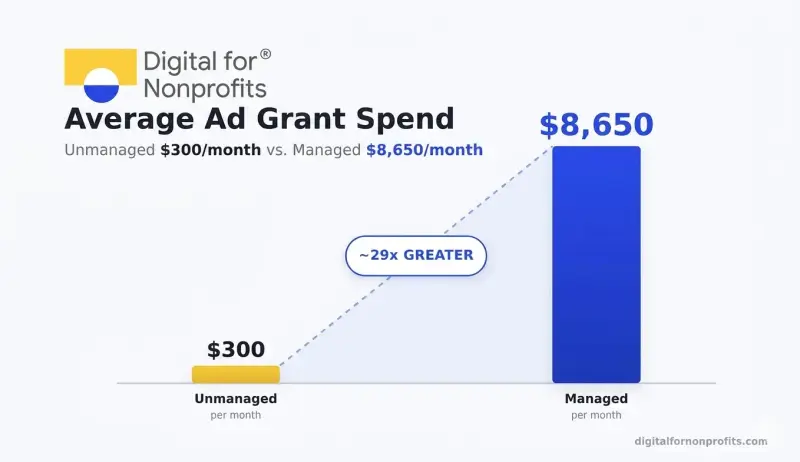
The average unmanaged Google Ad Grant account spends only $300 of the $10,000 monthly budget. Strategic management can push that to $8,000–$9,000+.
Maximizing your grant requires four things working together: the right campaign structure, long-tail keywords, landing pages that match search intent, and smart bidding.
Nonprofits that actively manage their Ad Grant account consistently generate 5–10x more conversions than those that set it and leave it.
Here is what often happens next: most of it goes unspent.
According to data from Google Ad Grant management specialists at Getting Attention, the average unmanaged Ad Grant account spends just $300 out of the available $10,000 each month. Their own managed accounts averaged $8,650 in monthly spend in January 2026, with 68% of accounts exceeding $9,000. The difference is not luck. It is a strategy.
This guide breaks down exactly how to maximize your Google Ad Grant every month, from how you build your campaigns to how you choose keywords, design landing pages, and track what is working. If your nonprofit is already approved but underutilizing its grant, this is the guide you need.
Why Most Nonprofits Struggle to Spend Their Full Google Ad Grant
Why Most Nonprofits Struggle to Spend Their Full Google Ad Grant (H2)
The problem is not the grant. The grant is generous. The problem is that Google Ad Grants come with rules that are stricter than standard Google Ads, and most nonprofit teams don't have the time or technical background to navigate them confidently.
Here is what typically holds organizations back:
Campaigns target keywords that are too broad. Terms like "donate" or "NGO" are technically allowed under Google's single-word keyword exceptions. But they attract high impressions with low relevance, which drags your click-through rate below the mandatory 5% threshold. Fall below that for two consecutive months, and your account risks suspension.
Landing pages don't match the search intent. Someone clicks your ad expecting volunteer opportunities and lands on your homepage instead. They leave. Google notices, and your Quality Score drops.
The bidding strategy is leaving money on the table. Many nonprofits stay on Maximize Clicks, which limits bids to a $2 cost-per-click (CPC) cap and locks you out of competitive keywords. The smarter path: start with Maximize Clicks to gather initial traffic data, then switch to Maximize Conversions once you have enough conversion history. Maximize Conversions lifts the $2 cap entirely and lets Google's algorithm bid more aggressively for users likely to take action on your site.
There is no conversion tracking in place. Without measuring what visitors do on your site (donations, signups, form fills), Google's algorithm has nothing to optimize toward. Conversion tracking is also a compliance requirement for all Ad Grants accounts. Without it, you risk account suspension.
According to D4NP's State of Nonprofits Digitization Report 2025, 83% of Indian NGOs are not using their free digital ad grants.
The gap between what is available and what is used is enormous. What follows is how to close it.
Build the Right Campaign Structure First
Think of your Google Ad Grants account like a filing system. If everything is in one folder, nothing is easy to find or manage. A well-structured account organizes your advertising by goal, and each goal gets its own campaign.
The recommended structure for most nonprofits: 3 to 5 campaigns.
After more than five campaigns, the account becomes difficult to manage. Fewer than three, and your targeting is too broad to perform well. Here is what those campaigns typically look like for a mid-sized NGO:
Brand campaign: Targets your organization's name and variations of it
Donate / fundraising campaign: Targets people searching to give to your cause
Programs/services campaign: Targets people looking for the specific help you provide
Volunteer / get involved campaign: Targets people who want to contribute their time
Awareness/issue campaign: Targets informational keywords related to your mission area
Each campaign contains ad groups: tightly clustered sets of related keywords. A good rule: all keywords in an ad group should lead to the same landing page. If they do not, you have a structuring problem.
Within each ad group, Google requires at least one active Responsive Search Ad (RSA). RSAs let you provide up to 15 headlines and 4 descriptions. Google's algorithm then tests different combinations to find what resonates best with each searcher. This built-in testing is an advantage, not a chore. It continuously optimizes your messaging without you manually creating multiple ad variants.
Start With Your Brand Campaign
Your brand campaign, targeting your own organization's name, is often the highest-performing campaign in an Ad Grant account. People searching specifically for your nonprofit are the most likely to convert. These searches also tend to have strong click-through rates (CTR), which helps your overall account health.
Set this up first. It also gives your account performance data to build from when you move to broader campaigns.
Keyword Expansion: How to Scale From 20 Keywords to 300
Most new Ad Grant accounts launch with a handful of keywords and plateau. To consistently spend close to $10,000 per month, you need to scale your keyword list intentionally without sacrificing quality.
The target for a high-performing account: 300 to 500 targeted keywords.
That sounds like a lot. Here is how to get there.
Focus on Long-Tail Keywords
Broad keywords like "climate change," "hunger relief," or "donate to charity" are technically allowed but rarely effective. They attract high impressions with low relevance, which drags your CTR below the mandatory 5% threshold. They also face intense competition from large organizations with paid accounts that can outbid Ad Grant accounts in the search auction.
Long-tail keywords, phrases of three or more words that reflect specific search intent, are where you win. They have lower competition, higher relevance, and better CTR. A few examples:
Instead of "food bank" → "free food bank near me for families"
Instead of "education NGO" → "free tutoring program for underprivileged children in Mumbai"
Instead of "volunteer" → "weekend volunteer opportunities with children's education NGO."
Use Google's Keyword Planner (free inside your Google Ads account) to explore what people in your audience are searching for. Start with your programs, your beneficiaries, and the problems your organization solves. Each of those is a keyword cluster.
Use Negative Keywords Liberally
A negative keyword is a term for which you do not want your ad to appear. It is one of the most underused tools in Ad Grant accounts.
Without negative keywords, a broad search like "bear conservation" might surface your endangered species NGO's ad for someone searching for "Chicago Bears game schedule." That wastes budget and hurts your CTR.
Review your Search Terms report weekly. This shows you the actual searches that triggered your ads. Any irrelevant term goes onto your negative keyword list. Over time, this makes your account far more efficient.
Set Every Campaign's Daily Budget to $329
Here is a budget mistake that cuts into grant utilization: splitting the $329 daily limit equally across campaigns. If you have four campaigns and set each to $82, you have self-imposed a cap that prevents Google from deploying budget toward your best-performing ads.
Instead, set every campaign's daily budget to the full $329 and let Google's algorithm decide how to distribute spend. Google caps total daily spend at $329 across the account. Your ads will never exceed that. But Google will push the budget toward what is performing, which maximizes utilization.
Smart Bidding: How to Break Through the $2 Cap
The Google Ad Grant's $2 maximum CPC applies when you use manual bidding or Maximize Clicks. For competitive keywords that cost more than $2 per click, your ads simply will not show under those strategies.
Smart bidding removes that ceiling.
When you switch to Maximize Conversions, Target CPA (cost per acquisition: the amount you want to spend per desired outcome), or Target ROAS (return on ad spend), Google's machine learning bids on your behalf. In Ad Grants accounts, these strategies are permitted to exceed the $2 cap when your account's performance merits it. That opens up access to higher-value, more competitive keywords.
There is one prerequisite: conversion tracking must be set up first.
Google's smart bidding strategies optimize toward conversions. If you have not defined what a conversion means for your nonprofit: a donation, a volunteer signup, a newsletter subscription, a contact form submission... the algorithm has nothing to work toward. Set up at least one meaningful conversion action before switching bidding strategies.
Here is the recommended progression for a new account:
Launch with Maximize Clicks to build initial traffic data and begin gathering conversion signals. Set up conversion tracking from day one.
Switch to Maximize Conversions once your account has recorded at least 15 to 30 conversions in 30 days. This gives Google's algorithm enough data to optimize effectively.
Graduate to Target CPA or Target ROAS once your account has a steady flow of conversions and you want tighter control over what each outcome costs.
This phased approach gives Google's algorithm enough information to optimize effectively, rather than making decisions blindly.
Landing Page Alignment: Where Grant Money Gets Wasted
Your campaign structure and keywords determine whether your ads show. Your landing pages determine whether clicks turn into something meaningful.
This is where many nonprofits leave the most money on the table.
The most common mistake: sending all ad traffic to the homepage. Your homepage is designed to welcome everyone. A landing page is designed to do one specific thing for one specific person. When someone clicks an ad about volunteering with urban youth and arrives at a general homepage, they have to work to find what they came for. Most do not bother.
Every ad group should link to a page that directly matches the search intent behind its keywords.
If your ad promotes free literacy programs in Chennai, the landing page should talk about free literacy programs in Chennai, not your organization's general mission. The closer the match between search query, ad copy, and landing page content, the better your Quality Score (a Google metric from 1 to 10 that measures ad relevance). And the better your Quality Score, the more your ads show.
Google requires a minimum Quality Score of 3. Keywords scoring below that are automatically paused. Most high-performing Ad Grant accounts operate at a Quality Score of 6 or above.
What a Strong Ad Grant Landing Page Looks Like
A clear, specific headline that matches the ad copy
One primary call to action (CTA) - donate, sign up, register, apply
No navigation links to unrelated pages (reduce distractions)
Mobile-friendly design (over 60% of Google searches happen on mobile)
Fast load time - pages that take more than 3 seconds to load lose visitors before they even read anything
At least one piece of social proof: a testimonial, an impact stat, a photo from your programs
Your website does not need to be rebuilt to meet this standard. Often, creating two or three dedicated landing pages for your highest-priority campaigns makes a significant difference in performance.
If your website has technical gaps, slow load speed, poor mobile experience, and a clear, specific headline that matches the ad copy
One primary call to action (CTA): donate, sign up, register, apply
No navigation links to unrelated pages (reduce distractions)
Mobile-friendly design (over 60% of Google searches happen on mobile)
Fast load time: pages that take more than 3 seconds to load lose visitors before they even read anything
At least one piece of social proof: a testimonial, an impact stat, a photo from your programs
Your website does not need to be rebuilt to meet this standard. Often, creating two or three dedicated landing pages for your highest-priority campaigns makes a significant difference in performance.
If your website has technical gaps, slow load speed, or a poor mobile experience, these also affect your Ad Grant compliance. According to D4NP's research, more than 50% of Indian nonprofits have websites that are slow or not mobile-friendly. That is a direct barrier to Ad Grant performance. Our digital maturity assessment can help you identify exactly where to focus.
Performance Tracking: What to Measure and When
Managing a Google Ad Grant without tracking is like running a program without measuring beneficiary outcomes. You cannot improve what you cannot see.
Here are the metrics that matter most, and what to do with them.
The Five Metrics to Watch
CTR is the one metric with a compliance consequence. If your account-level CTR falls below 5% for two consecutive months, Google may temporarily deactivate your account. Most deactivations are recoverable, but prevention is better than remediation.
Your Monthly Optimization Routine (2 to 4 Hours)
Active management does not require a full-time hire. A consistent monthly routine can keep your account healthy and growing:
Review the Search Terms report. Look for irrelevant searches triggering your ads. Add those terms as negative keywords.
Check keyword Quality Scores. Pause any keyword scoring below 3. Investigate keywords scoring 4 to 5 and improve their matching landing pages.
Review ad performance. Identify which RSA headlines and descriptions are rated "Low" by Google and replace them with new variations. Keep the ones rated "Good" or "Best."
Check budget utilization. If you are spending less than 70% of your monthly budget, expand your keyword list or add a new ad group.
Review conversions. Are your conversion actions still tracking correctly? Are certain campaigns generating more conversions than others? Shift focus accordingly.
As a best practice, log in to your account at least once per month and make substantive changes regularly. Actively managed accounts consistently outperform those left on autopilot.
What Is New in 2026: Performance Max and Google Maps
Several updates to the Ad Grants program have expanded what is possible for nonprofits.
Performance Max (PMax) campaigns became available to all Ad Grant accounts in January 2025. Unlike traditional Search campaigns that rely on keyword lists, PMax uses Google's AI to find potential supporters based on audience signals and conversion data. For Ad Grants accounts, PMax currently serves ads across Search and Maps only. YouTube, Gmail, Display, and Discover are not yet available to grant accounts, though Google has signaled further expansion may follow.
PMax works best when you give it clear inputs: audience signals (who you want to reach), high-quality creative assets, and clean conversion data. Without those, its performance is unpredictable.
Google Maps integration is particularly useful for local NGOs. If your organization has a physical presence: a community center, a clinic, a school... your ads can now appear on Maps when people search for services nearby. For organizations serving specific communities, this is a meaningful channel.
AI Max for Search began rolling out to Ad Grants accounts in mid-2025. Unlike PMax, which is a separate campaign type, AI Max is a feature layer you can apply to your existing Search campaigns. It lets Google's AI expand beyond your exact keyword list, test different ad copy combinations, and direct visitors to the landing page most likely to convert. Think of it as an AI upgrade to the Search campaigns you already run.
All three features are relatively new. Test them alongside your existing Search campaigns rather than replacing them outright until you have enough data to compare performance.
Ready to Activate Your Full $10,000 Every Month?
Managing a Google Ad Grant to its full potential takes consistent attention, technical knowledge, and an ongoing willingness to test and refine. The organizations spending $9,000 or more of their grant every month are not doing anything extraordinary; they are doing the basics consistently and well.
You can do this. And if your team needs a starting point eligibility check, account setup, or a full campaign build, D4NP helps nonprofits activate and maximize their Google Ad Grant from day one. Connect with us to get started →