How to Build an Email List for Your Nonprofit from Scratch
Learn how to build a nonprofit email list from zero: lead magnets, signup forms, segmentation, and privacy compliance basics. A step-by-step guide by D4NP.
Summary / TL;DR
Most nonprofits know they should be doing more with email. Few have a system for actually building the list. This guide gives you one. From choosing a lead magnet that attracts the right supporters, to placing signup forms where they'll convert, to segmenting your list from day one so every email feels relevant, each step is practical, low-cost, and designed for teams with limited time and no dedicated tech staff. Whether you're starting with zero subscribers or rescuing a stagnant list, you'll finish this guide with a clear action plan.
Email is the single highest-ROI digital channel for nonprofits: 33% of donors say it's what most inspires them to give, ahead of social media and websites.
You don't need a large budget or tech team to start. A free email service provider, a simple lead magnet, and a signup form in the right place are enough to build from zero.
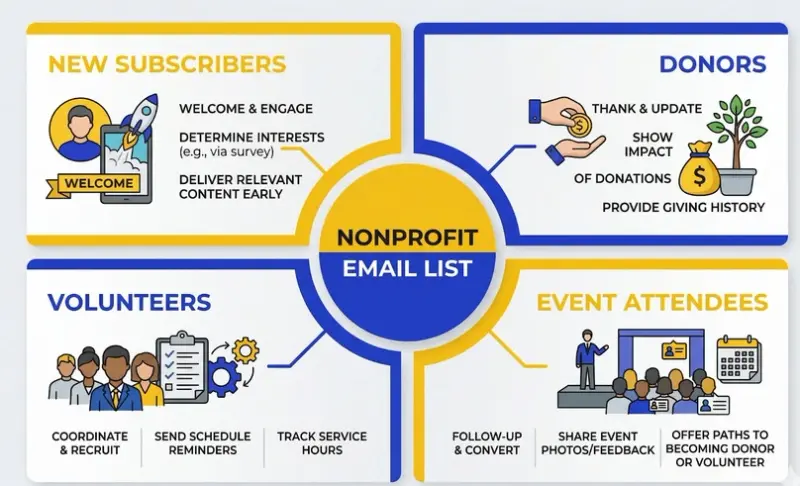
Segment your list from day one. Even four basic groups (new subscribers, donors, volunteers, event attendees) will dramatically improve engagement and reduce unsubscribes.
Why Your Email List Is Your Most Valuable Digital Asset
Before we get into how to build your list, it's worth understanding what you're building toward.
For Nonprofits, email marketing generates $30 for every dollar spent, a return that outperforms most other marketing channels by a significant margin. For nonprofits operating on tight budgets, that efficiency matters enormously.
Nonprofits report an average email open rate of 28.53%, surpassing the for-profit average of 21.2%. Your supporters are more likely to open your emails than customers are to open marketing messages from brands they've bought from. That's a genuine advantage, and most NGOs are leaving it on the table.
Here's the gap: Most nonprofits have no structured system for converting website visitors, event attendees, or social media followers into email subscribers. If your organisation is in that majority, this is one of the highest-leverage changes you can make.
Before You Begin: The 3 Foundations You Need
You don't need a sophisticated tech stack to start building your list. But you do need three things in place before your first subscriber arrives.
1. An email service provider (ESP)
An ESP is the platform you use to collect, store, and send emails to your list. Several options offer free or heavily discounted plans for nonprofits. Mailchimp, Brevo (formerly Sendinblue), and Mailerlite are solid starting points. If your nonprofit qualifies for Google for Nonprofits, the Google Workspace suite supports a professional email infrastructure, a strong foundation to build on. D4NP helps nonprofits activate Google for Nonprofits and identify the right tools at no cost.
2. A privacy policy on your website
Before you collect a single email address, your website needs a privacy policy that explains what data you collect, why you collect it, and how you use it. This isn't optional. It's both a legal requirement in most jurisdictions and a trust signal for your supporters. Most ESPs provide privacy policy templates you can adapt.
3. A clear value proposition
Why should someone subscribe to your emails? "Stay updated" is not an answer. "Receive our monthly impact digest: real stories from the communities we serve, plus one practical resource every month" is an answer. Before you build any form or lead magnet, write one sentence that answers: what does a subscriber get that they can't get anywhere else?
Step 1: Build Your Lead Magnet and Give Before You Ask
A lead magnet is a free resource you offer in exchange for someone's email address. It's the foundation of structured list-building, and it's highly effective. The key is choosing a lead magnet that truly serves your audience rather than just filling space.
For nonprofits, the most effective lead magnets are educational, practical, and closely tied to your mission. Here are six formats that work well across different NGO types:
1. Impact report or annual report (PDF) Package your annual report as a downloadable asset. This works especially well for organisations targeting donors, CSR managers, and funders who want evidence of outcomes before they engage.
2. A sector-specific resource guide or checklist. Create something your potential donors would genuinely find useful, meaningful, or emotionally engaging enough to exchange their email for. This could be a guide like “5 Ways to Support Children’s Education Beyond Donating,” “A Festival Giving Guide for Families Who Want to Give Back,” or “How Small Monthly Donations Create Long-Term Impact.” The best lead magnets answer a real question, show the value of your work clearly, and give supporters a stronger reason to stay connected to your cause.
3. A free mini-course or email series. If your nonprofit operates in a domain where knowledge is valuable, such as health, education, legal rights, or financial literacy. A short five-email course delivered over two weeks is an incredibly sticky lead magnet. Subscribers stay engaged because the value arrives in instalments.
4. A webinar or event recording. If you regularly run trainings, panel discussions, or community events, record them. Offer the recording as a free download. The content is already created; the lead magnet almost builds itself.
5. Exclusive newsletter with insider updates. Position your newsletter itself as the offer. Not "subscribe to our newsletter" but rather: "join 2,000 changemakers who receive our monthly Impact Digest: one story, one tool, one opportunity, every month." The framing makes the difference.
6. A toolkit or template bundle: If your nonprofit has developed practical resources through experience, package them into something useful and easy to access. For donor-focused nonprofits, this could include a giving guide, a festival giving catalogue, a campaign update pack, or a “how your donation helps” resource that makes support feel more tangible. For nonprofits that rely on retail fundraising, it could be a seasonal fundraiser guide, a shop-for-cause catalogue, event participation kit, or supporter resources for community-led fundraising. If you also work with institutions or peer organizations, toolkits such as volunteer onboarding checklists or fundraising planning templates can help attract that audience too. The goal is to offer something practical that gives people a strong reason to subscribe.
One important principle: your lead magnet should solve a real problem your specific audience faces. A children's education NGO offering a "Guide to Learning at Home" for parents serves a different audience than a women's rights organisation offering a "Know Your Rights" factsheet. The more specific your lead magnet, the more qualified your subscribers will be.
Step 2: Place Signup Forms Where Your Supporters Already Are
A great lead magnet sitting behind a hard-to-find form doesn't grow your list. Placement is a strategy.
On your website:
Your website is your highest-intent traffic source. Most visitors who arrive organically are already interested in your mission. Capture that intent by placing signup forms in multiple locations:
Homepage: A signup form or pop-up within the first scroll, ideally featuring your lead magnet prominently
Blog posts and resource pages: An inline form at the end of relevant articles, or a content upgrade (a lead magnet specific to that post's topic)
Donate page: After someone donates, immediately invite them to join your email list. They've already demonstrated commitment
About page: Supporters who read your story are highly engaged; give them a way to stay connected
Footer: A persistent footer form catches visitors who scroll to the bottom looking for ways to get involved
Only 17% of nonprofits use email subscribe popups on their website. Exit-intent popups (which appear when a visitor is about to leave) are particularly effective because they capture attention at a high-intent moment without interrupting the browsing experience.
At events:
In-person and virtual events are goldmines for list growth. Add a newsletter opt-in checkbox to every event registration form. At in-person events, place a QR code on your banners and table materials that links directly to your signup page. After the event, follow up with attendees and give them a clear, friction-free path to subscribe.
On social media:
Add your signup page link to your bio on LinkedIn, Instagram, and X. Then create posts that give people a clear reason to subscribe. For donor-focused nonprofits, this could be something like: “Want to see how your support creates real impact? Join our email list for stories from the field, campaign updates, and ways to help.” For nonprofits that rely on retail fundraising, the offer can be more specific: “Sign up to hear about our next fundraising drive, shop-for-cause campaign, or local giving event.” On Facebook, use your Page’s CTA button to link directly to your signup form.
Via partnerships:
Other organisations serving the same communities you serve already have the audiences you want. A guest article in their newsletter, a co-hosted webinar, or a resource exchange can introduce your email list to hundreds of warm, relevant new subscribers at once.
Step 3: Segment from Day One and Don't Treat Every Subscriber the Same
This is the step most nonprofits skip, and it's the one that separates high-performing email programmes from chaotic, unsubscribe-heavy lists.
Segmented email campaigns have an open rate that is 14.32% higher than non-segmented campaigns. Click-throughs are 100.95% higher in segmented campaigns. That's not a marginal improvement. Sending the right message to the right group essentially doubles your click-through performance.
Segmentation doesn't require complex software. Even a free Mailchimp account lets you tag and group subscribers. Start with these four core segments and build from there:
Segment 1: New subscribers / prospective supporters. These are people who signed up via your lead magnet or website but haven't donated or volunteered yet. They need nurturing: mission stories, social proof, and gentle invitations to engage further. Save the donation for later.
Segment 2: Donors (one-time vs. recurring) One-time donors who haven't given again and recurring monthly donors need completely different messages. A one-time donor needs to be thanked, shown impact, and invited back. A recurring donor needs to feel like an insider, receiving impact updates, milestone recognition, and appreciation for their sustained commitment.
Segment 3: Volunteers are around 11 times more likely to donate than the average person. This segment deserves its own communication thread: volunteer opportunities, behind-the-scenes updates, and a clear pathway toward financial support if and when they're ready.
Segment 4: Event attendees. People who have attended your events have demonstrated a willingness to show up for your cause. They're warm, action-oriented, and more likely to respond to future event invitations, campaign appeals, and volunteer asks than general subscribers.
The practical setup: create one master email list in your ESP, then use tags or groups to label each subscriber. When you send a campaign, you simply filter by the relevant tag. You don't need multiple lists. You need one well-organised list.
Step 4: Send a Welcome Sequence That Earns Trust
The moment someone subscribes is the moment they're most interested in you. Don't waste it by going quiet for two weeks, or by jumping straight to a donation ask.
Welcome emails in B2C campaigns have open rates of 68.6% or higher. For nonprofits, that number can be even higher because subscribers have self-selected around a cause they care about. Use that attention.
A simple three-email welcome sequence covers the essentials:
Email 1, Day 0: Thank you + deliver the lead magnet. Send immediately. Thank the subscriber for joining, deliver the promised resource, and set expectations: "Over the next few weeks, you'll hear from us about [what you send and how often]." Keep it short. No donation asked.
Email 2, Day 3: Your mission story. Share the human story behind your work. One person whose life is different because of what your organisation does. One specific moment that captures why your team shows up every day. Link to your most compelling case study or impact page. This email builds the emotional connection that makes every future communication more effective.
Email 3, Day 7: First invitation to engage. This is your first soft ask, and not necessarily for money. Invite the subscriber to follow you on LinkedIn, attend an upcoming event, read a key blog post, or share your mission with someone they know. Build the relationship before you ask for a donation.
After the welcome sequence, move subscribers into your regular communication rhythm, whether that's a monthly newsletter, a quarterly impact digest, or a mix of campaigns and updates.
Step 5: Stay Compliant with Privacy and Data Protection Rules
List building comes with legal responsibilities. These aren't bureaucratic obstacles. They're the foundation of trust between your organisation and your supporters. Ignoring them can result in fines, blacklisted emails, and serious reputational damage.
Here are the three non-negotiables for every nonprofit building an email list:
1. Explicit opt-in consent: Every subscriber on your list must have actively chosen to receive emails from you. No pre-ticked checkboxes. Do not add people to your list because they attended an event without being asked. No purchasing email lists. When someone downloads your lead magnet, your signup form must clearly state that they will also receive your emails, and they must tick a box to confirm.
2. A clear, visible unsubscribe option. Every email you send must contain an unsubscribe link. Most ESPs add this automatically, but verify it's present and functional. When someone unsubscribes, honour the request immediately. Continuing to email people who have opted out is both illegal and damaging to your sender's reputation.
3. A linked privacy policy on every form. Your signup forms must link to your privacy policy. The policy must explain what data you collect, why, how you use it, and how subscribers can request its deletion.
Which laws apply to your nonprofit?
If you operate in or communicate with supporters in the European Union, GDPR (General Data Protection Regulation) applies. In the United States, CAN-SPAM sets the baseline. Canada follows CASL. India's Digital Personal Data Protection Act (DPDP) 2023 applies to Indian organisations collecting digital personal data. Reputable ESPs like Mailchimp, Brevo, and Mailerlite have compliance features built in. Use them.
The simplest rule: if you wouldn't feel comfortable explaining to a supporter exactly how you got their email address and what you're doing with it, you shouldn't be emailing them.
What Not to Do: 4 Email List Mistakes That Drain NGO Resources
1. Buying or renting email lists. Purchased lists are full of people who have never heard of you and never agreed to hear from you. Open rates tank, spam complaints spike, and your sender reputation (the invisible score that determines whether your emails reach inboxes or spam folders) degrades quickly. Never do this.
2. Ignoring list hygiene. For nonprofits, approximately 11% of all emails are not delivered on average. Bad email addresses, spam traps, and inactive subscribers contribute to this. Set a quarterly reminder to remove hard bounces (permanently undeliverable addresses) and consider a re-engagement campaign for subscribers who haven't opened an email in six months. Ask them if they still want to hear from you. The ones who don't will help your deliverability by leaving.
3. Skipping mobile optimisation. Most supporters will read your emails on their phones. If your email template doesn't render correctly on mobile (text too small, images broken, buttons too close together to tap), you lose the engagement before it starts. Choose a mobile-responsive template and preview every email on a phone before sending.
4. Adding people without consent. This is the most common mistake. A well-meaning programme manager adds every business card collected at a conference. A communications team adds all past event attendees without a clear opt-in. Even when intent is good, this practice damages your list quality and your reputation, and in many jurisdictions, it's illegal. Always ask. Always get explicit consent.
Your Next Step: Find Out Where Your Nonprofit Stands Digitally
Building an email list is one piece of a larger digital maturity picture. Many nonprofits we work with discover that their website's technical issues, missing analytics, or lack of a structured digital strategy are limiting the impact of everything they do, including email marketing.
D4NP's free Tech Assessment helps your nonprofit understand exactly where you stand across digital assets, outreach, and fundraising infrastructure, and what to prioritise first. If your nonprofit is eligible for technology grants, including up to $10,000/month in Google Ad credits, we'll identify that too.